
4K vs 5K Monitor for Photo Editing: Which Do You Need?
Some links on this site are affiliate links, including Amazon Associates and other affiliate programs. If you buy through them, PhotoCultivator may earn a commission at no extra cost to you. As an Amazon Associate I earn from qualifying purchases.
Should you upgrade from 4K to 5K?
The photography world is divided. Some swear by 4K as the sweet spot for professional work, while others insist 5K is essential for serious editing. Both camps have valid points, but neither tells the complete story.
The real technical difference: 5K packs 78% more pixels into the same screen area than 4K, giving 218 PPI versus 163 PPI at 27 inches. That sharpness gain matters for certain workflows and is irrelevant for others.
Looking for specific monitor picks by budget and use case? See the best monitor for photo editing guide.
If you’re just starting your photography journey, I recommend first reading my comprehensive ultimate photography guide for beginners to understand the fundamentals before investing in high-resolution display technology.
Quick Answer: A 5K monitor delivers 218 PPI versus 163 PPI at 27 inches, noticeably sharper up close, particularly when viewing 42MP+ files at 1:1 or evaluating fine detail for large-format prints. For cameras under 42MP and most web or social media work, 4K is the better value at $400–$800. The main difference between 4K and 5K is pixel density: 5K packs 78% more pixels into the same screen area, which matters most for critical retouching, large-print production, and high-resolution camera files.
Find Your Ideal Resolution in 60 Seconds
Before diving into technical details, use this quick decision framework to identify your ideal resolution:
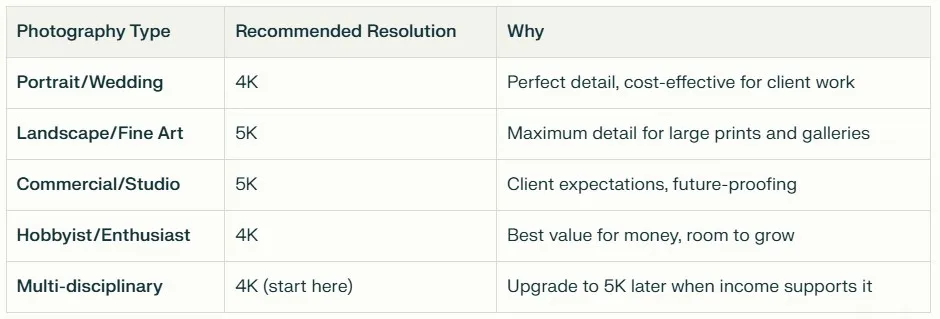
| Photography Type | Recommended Resolution |
|---|---|
| Portrait / Wedding | 4K |
| Landscape / Fine Art | 5K |
| Commercial / Studio | 5K |
| Hobbyist / Enthusiast | 4K |
| Multi-disciplinary | 4K (upgrade to 5K when ready) |
Quick Assessment Questions
Choose 4K if you:
- Work primarily with 24MP or lower resolution cameras
- Edit mostly for web, social media, or standard prints
- Have a budget under $800 for your complete setup
- Use older graphics cards (GTX 1660 or similar)
- Value smooth performance over maximum detail
Choose 5K if you:
- Shoot with 42MP+ cameras regularly
- Create large gallery prints or commercial work
- Have clients who expect “the latest technology”
- Can invest $1,500+ in your complete setup
- Need every pixel for critical detail work
This quick assessment covers 80% of use cases, but keep reading for the complete technical analysis and comparison.
What Is the Difference Between 4K and 5K Monitors?
The numbers tell only part of the story. Let’s break down what 4K vs 5K actually means for your photography workflow.
4K Specifications: The Professional Standard
Resolution: 3840 x 2160 pixels (8.3 million total pixels)
4K delivers sharp, detailed images that work perfectly for most photography applications. Here’s what these numbers mean in practice:
Pixel Density by Screen Size:
- 27” 4K display: 163 pixels per inch (PPI)
- 32” 4K display: 137 pixels per inch (PPI)
The 27” size hits the sweet spot. At 163 PPI, text stays crisp, images look sharp, and you won’t need scaling for comfortable viewing. Most photographers find this density perfect for 8-hour editing sessions.
Real-World Workspace Benefits:
- Lightroom: Comfortable panel layout with room for large preview
- Photoshop: Full tool palettes visible alongside your image
- Web browsing: Sharp text without strain
- Multiple applications: Easy side-by-side workflow
Graphics Card Requirements:
4K works smoothly with mid-range graphics cards. You’ll get good performance with:
- NVIDIA GTX 1660 or better
- AMD RX 580 or better
- Most recent integrated graphics (for basic editing)
5K Specifications: Maximum Detail
Resolution: 5120 x 2880 pixels (14.7 million total pixels)
5K provides 78% more pixels than 4K, but this increase comes with trade-offs in cost and system requirements.
Pixel Density Advantages:
- 27” 5K display: 218 pixels per inch (PPI)
- Matches Apple’s Retina standard
- Extremely sharp text and interface elements
- Superior detail rendering for pixel-peeping
Workspace Benefits for Photography:
- More panel space: Lightroom’s develop module with expanded tools
- Larger preview area: See more of your image while editing
- Better scaling: Crisp interface at 150% scaling if needed
- Future-proofing: Ready for next-generation camera files
System Requirements and Costs:
5K demands more from your system:
- Graphics cards: RTX 3070 or better recommended
- RAM: 32GB minimum for smooth performance
- Storage: Fast NVMe SSD essential
- Connectivity: Thunderbolt 3/4 preferred
5K workflows demand powerful hardware, and if you’re editing on a laptop, the best laptops for photo editing and gaming guide will help you determine whether your current system can handle 5K editing smoothly or if you need to upgrade your mobile workstation.
Key Differences for Photographers
Pixel-Level Editing Capabilities:
4K Performance:
- Comfortable 1:1 viewing up to 24MP images
- Good detail visibility for most retouching work
- Smooth zooming and panning
- Fast brush and adjustment tool response
5K Performance:
- True 1:1 viewing for 42MP+ images
- Exceptional detail visibility for critical work
- More demanding on system resources
- Potential lag with older graphics cards
Image Scaling and Viewing:
The resolution difference becomes most apparent when viewing large camera files:
- 24MP files on 4K: Perfect 1:1 viewing, crisp detail
- 24MP files on 5K: Image appears smaller, uses only part of screen
- 42MP files on 4K: Requires scaling, some detail loss in preview
- 42MP files on 5K: Better 1:1 viewing, superior detail rendering
Interface Real Estate:
5K monitors provide significantly more workspace for your editing applications:
Lightroom Develop Module:
- 4K: Basic panel layout, standard histogram size
- 5K: Expanded panels, larger histogram, more preset previews
Photoshop Workflow:
- 4K: Standard tool arrangement, moderate canvas space
- 5K: Multiple tool panels open, larger working canvas area
Print Preview Accuracy:
5K monitors excel at print preview thanks to higher pixel density:
- Sharper preview: Better representation of final print quality
- Color accuracy: More precise color gradients and transitions
- Detail rendering: Superior fine detail preview for large prints
However, 4K monitors still provide excellent print preview accuracy for most applications, especially when properly calibrated. Even a well-calibrated screen can mislead on brightness, which is one reason prints come out darker than your screen if you never adjust for it.
How Resolution Affects Your Photography Workflow
Resolution choice impacts every aspect of your editing process, from file import to final export. Here’s how each resolution performs in real-world photography workflows.
4K Workflow Benefits
Smooth Performance with Current Graphics Cards:
Most photographers already own graphics cards that handle 4K effortlessly. Published performance with popular cards varies by tier:
- RTX 3060: Smooth 4K editing, fast brush response
- GTX 1660: Good 4K performance, occasional lag with heavy filters
- Integrated graphics: Basic 4K editing possible, limited for complex work
This means you can upgrade to 4K without changing your entire system.
Adequate Detail for Most Photography Work:
4K provides excellent detail visibility for common photography tasks:
Portrait Photography:
- Clear skin detail for retouching
- Sharp eye detail for precise editing
- Good hair detail rendering
- Smooth color gradients
Landscape Photography:
- Sufficient detail for most nature work
- Good texture visibility
- Clear horizon lines and edges
- Adequate for prints up to 24”×36”
Commercial Photography:
- Professional quality for most client work
- Good product detail rendering
- Clear text and graphic elements
- Suitable for web and print delivery
Better Price-to-Performance Ratio:
4K monitors offer exceptional value:
- Entry-level professional: $400-600
- High-end 4K: $800-1,200
- System requirements: Work with existing hardware
- Longevity: 5-7 year lifespan for most users
For budget 4K picks under $500, see the budget photo editing monitor guide.
Wider Monitor Selection:
The 4K market offers more choices across all price points:
- Budget options: ASUS, Dell, LG models under $500
- Professional models: Extensive selection from all major brands
- Specialized features: Hardware calibration, wide gamuts, ergonomic stands
- Size variety: 24”, 27”, 32”, and ultrawide options
5K Workflow Benefits
True 1:1 Pixel Viewing for High-Resolution Cameras:
5K monitors shine with modern high-resolution cameras:
42MP+ Camera Files:
- Perfect 1:1 viewing without scaling
- Every pixel visible at comfortable viewing distance
- Superior detail rendering for critical work
- Better representation of final image quality
Medium Format Files:
- Excellent rendering of 50MP+ files
- Professional-grade detail visibility
- Critical for commercial retouching work
- Essential for large format printing
More Screen Real Estate for Panels and Tools:
5K provides significantly more workspace:
Lightroom Benefits:
- Larger develop module preview
- More visible adjustment panels simultaneously
- Bigger histogram and navigator panels
- Room for custom panel arrangements
Photoshop Advantages:
- Multiple tool panels open without crowding
- Larger brush previews and selections
- More visible layers and channels
- Better multi-document workflow
Better Future-Proofing for Camera Upgrades:
5K monitors prepare you for photography’s future:
Camera Technology Trends:
- 50MP+ cameras becoming standard
- 8K video capabilities in photography cameras
- Larger file sizes requiring more detail
- Professional expectations rising
Software Evolution:
- Editing applications using more screen space
- Higher resolution interface elements
- Advanced AI tools requiring detail visibility
- Cloud-based workflows with larger previews
Superior Detail Rendering for Fine Adjustments:
5K excels at precision editing tasks:
Critical Detail Work:
- Jewelry and product photography
- Architectural photography with fine details
- Fine art reproduction
- Medical and scientific photography
Color Grading Precision:
- More accurate color transition previews
- Better gradient rendering
- Superior shadow and highlight detail
- Improved local adjustment visibility
Performance Considerations by Resolution
Documented performance differences between the two resolutions include:
Editing Speed Considerations:
Brush Tool Response:
- 5K: Large brush operations can lag on older or entry-level GPUs.
Export Performance:
Export speeds are determined by CPU and storage, not monitor resolution, for both 4K and 5K.
Detail Visibility Differences:
Zoom Level Comparison:
- 4K at 100%: Good detail for most work
- 5K at 100%: Exceptional detail for critical work
- 4K at 200%: Some pixelation visible
- 5K at 200%: Maintains smooth detail rendering
Color Grading Precision:
Gradient Rendering:
- 4K: Smooth gradients, adequate for most work
- 5K: Superior gradients, better for critical color work
Shadow Detail:
- 4K: Good shadow detail visibility
- 5K: Exceptional shadow detail, crucial for dramatic lighting
Print Preview Accuracy:
5K’s higher pixel density gives sharper on-screen preview of large prints, which matters most when evaluating fine detail before sending to a large-format printer.
4K handles the vast majority of photography work; 5K provides measurable advantages for specific high-end applications.
Further Reading
The Dell UltraSharp U2725QE (4K) and Apple Studio Display (5K) are both reviewed in the best monitor for photo editing guide, which covers all six picks across every budget and use case.
Frequently Asked Questions
How much better is a 5K monitor up close?
At 27 inches, a 5K monitor delivers 218 PPI versus 163 PPI for 4K, which is 33% more pixel density. This difference is most visible when viewing 42MP+ files at 1:1 or evaluating fine texture in portraits and large-format print previews. For work under 42MP, the practical on-screen difference is modest.
Who needs a 5K monitor?
5K suits photographers who shoot with 42MP+ cameras regularly, produce large gallery prints or commercial work, or need true 1:1 pixel viewing for critical retouching. Most photographers editing for web, social media, or standard print sizes won’t see a meaningful workflow improvement over a well-calibrated 4K display.
Do I need a 4K monitor for photo editing?
4K is the current professional standard and handles 90% of photography work excellently. At 163 PPI on a 27-inch screen, it is sharp enough for serious retouching, print-size evaluation, and color grading. If you edit primarily for web or social media, 4K gives you comfortable headroom without the price premium of 5K.
Is 5K worth it for photographers?
5K is worth it when your workflow specifically demands it: 42MP+ cameras, large-format print production, or critical commercial retouching where every pixel counts. For most solo photographers, a well-calibrated 4K monitor delivers professional results at a significantly lower price. Color accuracy and calibration quality matter more than raw resolution for the majority of editing tasks.