
Photo Editing Laptops: Top 8 Picks (Budget to Premium)
Some links on this site are affiliate links, including Amazon Associates and other affiliate programs. If you buy through them, PhotoCultivator may earn a commission at no extra cost to you. As an Amazon Associate I earn from qualifying purchases.
Looking for a laptop that excels at both photo editing and gaming?
This comprehensive guide breaks down the best options for 2025, from premium powerhouses to budget-friendly alternatives.
Quick Comparison
What You’ll Learn:
- Premium vs budget laptop recommendations
- Essential specs for photo editing performance
- Real-world performance in Lightroom & Photoshop
- Gaming capabilities of each model
- Price-to-performance analysis
Before diving into the reviews, here’s what photographers need in a laptop for efficient photo editing:
Minimum Requirements:
- 16GB RAM for smooth performance
- Color-accurate display (100% sRGB)
- SSD storage (minimum 512GB)
- Latest generation processor
- Dedicated graphics card (recommended)
Here are the top options that balance photo editing capabilities with gaming performance, starting with my premium selections:
Premium Laptops
1. MacBook Air M3 - Best for Photo Editing
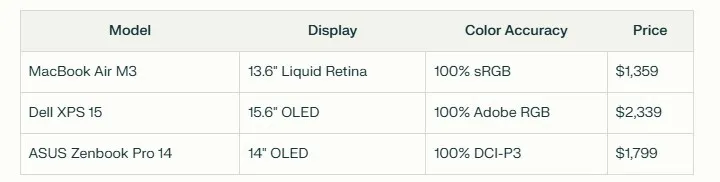
Price: $1,359 Display: 13.6” Liquid Retina (2560 x 1664) Processor: Apple M3 chip RAM: Up to 24GB unified memory Storage: Up to 2TB SSD
The MacBook Air M3 delivers exceptional photo editing performance in a remarkably portable package.
Its Liquid Retina display offers P3 wide color and 500 nits brightness, making it ideal for precise color work in Lightroom and Photoshop.
Learn how to optimize your editing workflow in our detailed Lightroom desktop performance guide
Performance Highlights:
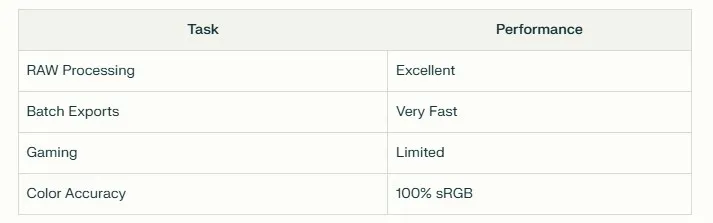
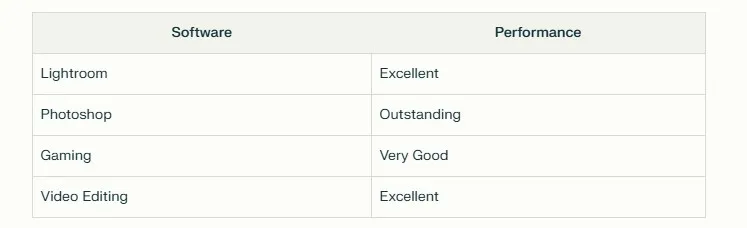
- Lightroom Classic: Smooth handling of large RAW files
- Photoshop: Near-instant filter applications
- Battery Life: Up to 18 hours
- Weight: Just 2.7 pounds
Pros:
- Exceptional color accuracy
- 18+ hours battery life
- Silent operation (no fans)
- Powerful M3 chip performance
- Portable design at 2.7 lbs
Cons:
- Limited gaming capabilities
- No dedicated GPU
- Port selection could be better
- Maximum 24GB RAM
Perfect for: Professional photographers who prioritize portability and battery life over gaming performance. Ideal for on-location editing and travel photography.
If you are building a full editing setup, pairing your laptop with a calibrated external monitor makes a significant difference. Here are the best monitors for photo editing at every budget.
2. Dell XPS 15 (2023) - Ultimate Performance Pick
Price: $2,339 Display: 15.6” OLED (3.5K, 3456 x 2160) Processor: Intel Core i9-13900H GPU: NVIDIA RTX 4070 RAM: Up to 64GB DDR5 Storage: Up to 4TB SSD (2x 2TB)
The Dell XPS 15 stands as a powerhouse for professional photo editing, combining exceptional color accuracy with robust gaming capabilities. Its stunning OLED display delivers true-to-life colors with 100% Adobe RGB coverage.
Performance Metrics:
- Adobe RGB: 100% coverage
- DCI-P3: 100% coverage
- Brightness: 400 nits
- Contrast ratio: 100,000:1
Key Features:
- User-upgradeable RAM and storage
- Premium aluminum build
- Thunderbolt 4 ports
- SD card reader built-in
- RTX 4070 for GPU acceleration
Pros:
- Professional-grade display
- Powerful RTX graphics
- Expandable storage options
- Premium build quality
- Excellent thermal management
Cons:
- Premium price point
- Battery life could be better
- Runs warm under load
- Heavier than competitors
Perfect for: Professional photographers and content creators who need desktop-class performance in a portable package. Ideal for both intensive photo editing and high-end gaming.
To complement your laptop, see my comparison of top photo editing monitors.
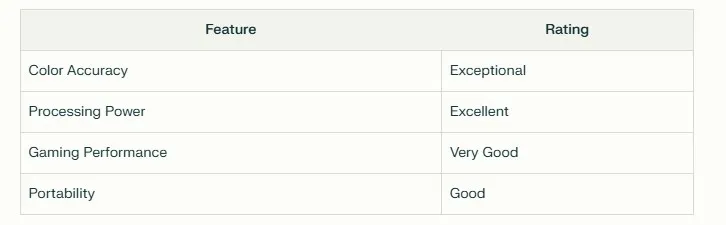
3. ASUS Zenbook Pro 14 OLED (2024) - Best Display Quality
Price: $1,799 Display: 14.5” OLED (2.8K, 2880 x 1800) Processor: Intel Core Ultra 9 GPU: NVIDIA RTX 4070 RAM: Up to 32GB LPDDR5X Storage: Up to 2TB PCIe 4.0 SSD
The Zenbook Pro 14 OLED sets a new standard for display quality in portable workstations. Its OLED panel delivers stunning visuals with VESA DisplayHDR True Black 500 certification and professional-grade color accuracy.
Display Specifications:
- Adobe RGB: 100% coverage
- DCI-P3: 100% coverage
- Refresh Rate: 120Hz
- Response Time: 0.2ms
- Peak Brightness: 600 nits
Key Features:
- Pantone Validated display
- AI-powered performance
- Thunderbolt 4 connectivity
- ProArt Creator Hub
- Advanced cooling system
Pros:
- Professional-grade OLED display
- Powerful Intel Core Ultra 9
- Compact form factor
- RTX 4070 graphics
- Excellent color accuracy
Cons:
- Limited battery life
- Premium price point
- Can run warm under load
- No SD card reader
Perfect for: Creative professionals who demand exceptional color accuracy and powerful performance in a compact package. Ideal for photographers who work with high-resolution images and need reliable color reproduction.
4. Apple MacBook Pro 16 (M3, 2023) - Professional Powerhouse
Price: $3,400 Display: 16.2” Liquid Retina XDR Processor: Apple M3 Pro/Max RAM: Up to 128GB unified memory Storage: Up to 8TB SSD
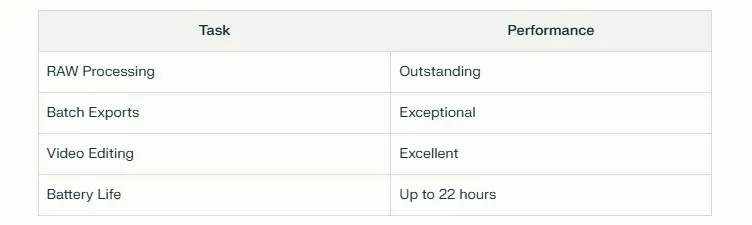
The MacBook Pro 16 represents Apple’s most powerful mobile workstation, delivering desktop-class performance for professional photo editing. Its Liquid Retina XDR display offers exceptional brightness and contrast, though with some limitations for color-critical work.
Display Specifications:
- Peak Brightness: 1600 nits
- Contrast Ratio: 1,000,000:1
- P3 Color: 100% coverage
- Adobe RGB: 90% coverage
- ProMotion: 120Hz
Performance Highlights:
- Lightroom: Near-instant previews
- Photoshop: Fluid large file handling
- Multiple streams of 4K video
- Seamless multitasking
Discover the perfect streaming setup in my guide to the best cameras for live streaming events
Pros:
- Exceptional battery life
- Powerful M3 Pro/Max chip
- Superior build quality
- Advanced thermal design
- ProMotion display
Cons:
- Premium price point
- Not full Adobe RGB coverage
- Limited upgradeability
- Heavy for travel (4.7 lbs)
Perfect for: Professional photographers and studios requiring maximum performance and extended battery life. Ideal for those deeply invested in the Apple ecosystem who need reliable performance for large photo catalogs and intensive editing sessions.
5. Razer Blade 14 (2024) - Best Gaming-Photography Hybrid
Price: $2,499 Display: 14” QHD+ (2560 x 1600) Processor: AMD Ryzen 9 8945HS GPU: NVIDIA RTX 4070 RAM: 32GB DDR5 Storage: 1TB PCIe Gen 4 SSD
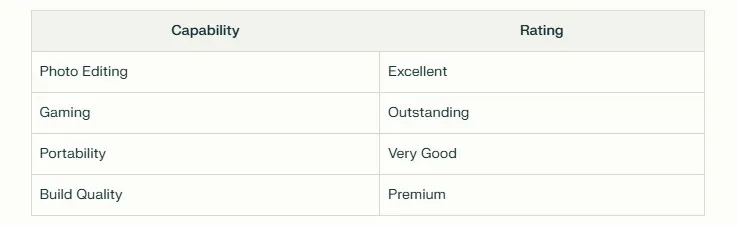
The Razer Blade 14 masterfully bridges the gap between gaming performance and creative productivity. This compact powerhouse delivers desktop-class performance for both photo editing and gaming in a surprisingly portable package.
Performance Metrics:
- Display: 240Hz refresh rate
- Color Coverage: 100% DCI-P3
- Response Time: 3ms
- Brightness: 500 nits
Key Features:
- CNC aluminum unibody
- Vapor chamber cooling
- Per-key RGB lighting
- USB 4.0 connectivity
- Windows Hello IR camera
Pros:
- Compact yet powerful
- RTX 4070 graphics
- Premium build quality
- Excellent display quality
- Advanced cooling system
Cons:
- Premium price point
- Fan noise under load
- Shorter battery life
- Overkill for pure photo editing
Perfect for: Content creators who demand high-performance gaming capabilities alongside professional photo editing. Ideal for streamers, gaming photographers, and creative professionals who need versatility.
Essential Specifications Guide
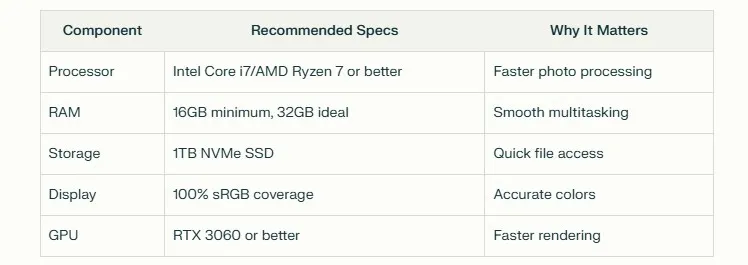
Minimum Requirements for Professional Photo Editing:
Display Requirements:
- Resolution: Minimum 2560 x 1440 (QHD)
- Color Accuracy: 100% sRGB coverage
- Brightness: Minimum 400 nits
- Panel Type: IPS or OLED
Performance Priorities:
- Photo Editing Performance
- Fast processor for RAW processing
- Dedicated GPU for Lightroom/Photoshop acceleration
- High-speed SSD for quick file access
- Multitasking Capability
- 16GB RAM minimum for running multiple apps
- Latest generation processors for smooth operation
- Efficient thermal design for sustained performance
- Display Quality
- High color accuracy for precise editing
- Anti-glare coating recommended
- Wide viewing angles
- HDR support preferred
Prioritize color accuracy and processing power over gaming features if photography is your main focus. A well-balanced system will provide better long-term value than one focused solely on gaming performance.
Budget-Friendly Laptop Recommendations for Photo Editing
If you’re just starting in photography and need a laptop that won’t break the bank, several budget-friendly options still offer solid performance for photo editing tasks.
Here are a few recommendations under $800 that balance affordability with essential features:
Budget Laptops
1. Acer Swift 3 (2022) - Best Budget Photo Editing Laptop
Price: $600-$700 Display: 14” QHD (2560 x 1440) Processor: Intel Core i7/AMD Ryzen 7 RAM: 8-16GB Storage: Up to 1TB SSD
The Acer Swift 3 delivers exceptional value for photographers on a budget. Its QHD display offers impressive color accuracy with 98% sRGB coverage and a contrast ratio of 1,619:1, making it suitable for precise photo editing work.
Display Quality:
- Brightness: 368 nits
- Contrast: 1,330:1
- Color Accuracy: Delta-E of 1.51
- sRGB: 98% coverage
- Adobe RGB: 75% coverage
Performance Highlights:
- Fast processor for smooth photo editing
- Quick SSD storage access
- Excellent build quality with all-metal construction
- Lightweight at 1.4kg
- Up to 6 hours battery life
Pros:
- High-resolution QHD display
- Professional-grade color accuracy
- Solid build quality
- Excellent value for money
- Portable design
Cons:
- Limited gaming performance
- Battery life could be better
- Smaller 14-inch screen
- No full Adobe RGB coverage
Perfect for: Beginning photographers and students who need a reliable photo editing laptop without breaking the bank. Ideal for Lightroom and Photoshop work while maintaining portability.
2. Asus VivoBook 15 - Best Entry-Level Option
Price: $500-$600 Display: 15.6” Full HD (1920 x 1080) Processor: AMD Ryzen 5/Intel Core i5 RAM: 8GB (Upgradeable to 16GB) Storage: 512GB SSD
The ASUS VivoBook 15 proves that effective photo editing doesn’t require a premium price tag. This budget-friendly laptop offers the essential features needed for basic photo editing tasks while maintaining affordability.
Value Features:
- Full HD NanoEdge display
- Fast NVMe SSD
- Upgradeable components
- ErgoLift hinge design
- Wi-Fi 6 connectivity
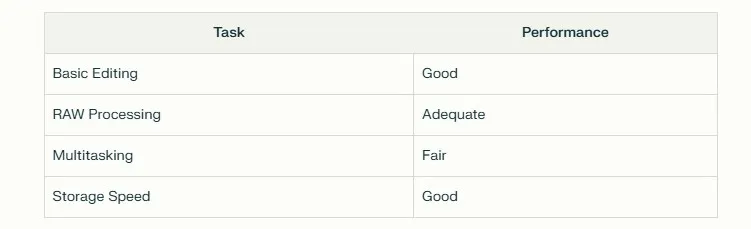
Performance Notes:
- Handles Lightroom Classic adequately
- Smooth Photoshop performance with basic tasks
- Quick file transfers with NVMe SSD
- Efficient thermal management
- Supports external displays
Pros:
- Budget-friendly price
- Upgradeable RAM
- Decent 1080p display
- Good connectivity options
- Lightweight design
Cons:
- Limited color accuracy
- Basic integrated graphics
- Average build quality
- Entry-level performance
Perfect for: Photography enthusiasts starting their editing journey, students learning photo editing, or hobbyists who need a reliable machine for basic photo management and editing tasks.
3. Lenovo IdeaPad 3 - Most Affordable Option
Price: $400-$600 Display: 15.6” Full HD (1920 x 1080) Processor: AMD Ryzen 5/Intel Core i5 RAM: 8GB (Upgradeable to 16GB) Storage: Up to 512GB SSD
The Lenovo IdeaPad 3 represents the sweet spot between affordability and functionality for beginner photographers. While it won’t compete with premium options, it handles basic photo editing tasks competently.
Key Specifications:
- TN panel with anti-glare coating
- 45% NTSC color gamut
- Dual-core processing
- AMD Radeon/Intel UHD Graphics
- Rapid Charge technology
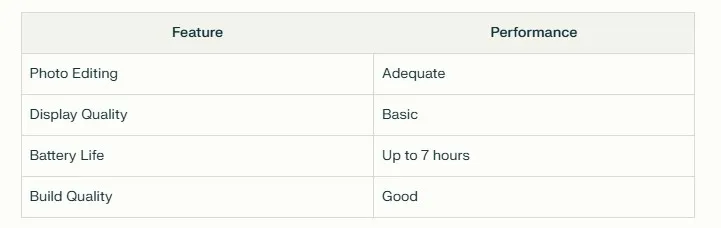
Performance Overview:
- Handles basic Lightroom tasks
- Suitable for simple Photoshop edits
- Quick boot times with SSD
- Efficient power management
- Good thermal performance
Pros:
- Very affordable price point
- Upgradeable components
- Solid build quality
- Good battery life
- Quiet operation
Cons:
- Limited color accuracy
- Basic display quality
- Entry-level graphics
- Average multitasking
Perfect for: Budget-conscious beginners, students learning photography basics, or casual photographers who need a reliable machine for simple editing tasks and photo organization.
For more affordable photography options, explore my curated list of the best cameras under $300
Essential Buying Guide
Minimum Specifications for Budget Photo Editing:
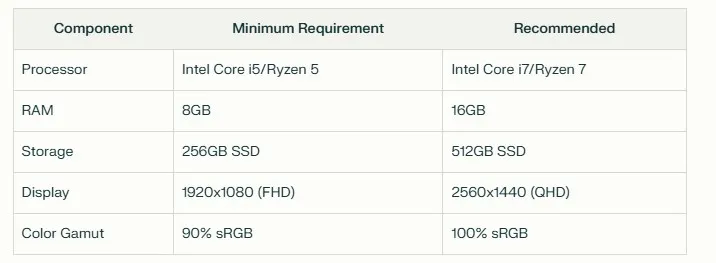
Premium vs Budget: What You Get
Premium Features ($1,500+):
- Professional color accuracy
- Higher resolution displays
- Better build quality
- Faster performance
- Longer lifespan
Budget Features ($400-800):
- Basic photo editing capability
- Adequate color reproduction
- Upgradeable components
- Essential connectivity
- Decent build quality
Protect your investment with myessential camera gear storage and protection tips
Final Recommendations
Best Overall: Dell XPS 15 (2023)
- Perfect balance of performance and display quality
- Excellent build quality
- Professional-grade color accuracy
Best Value: MacBook Air M3
- Outstanding performance per dollar
- Excellent battery life
- Great color accuracy
Best Budget: Acer Swift 3
- Solid performance at lower cost
- Good display quality
- Excellent portability
Making Your Decision
Consider these factors when choosing:
- Your editing software requirements
- Regular workflow demands
- Available budget
- Portability needs
- Future upgrade plans
Invest in the best display quality your budget allows - it’s key for accurate photo editing.
New to photography? Start with my Ultimate Photography Guide for Beginners
Master your craft with my 14 Essential Tips to Master Your Photography
-Hakan
Founder, PhotoCultivator.com
For more photography tips and tricks, check out my Ultimate Photography Guide for Beginners and 14 Essential Tips to Master Your Photography.