
7 Best Beginner Vlogging Cameras Under $300: Complete Starter Guide
Some links on this site are affiliate links, including Amazon Associates and other affiliate programs. If you buy through them, PhotoCultivator may earn a commission at no extra cost to you. As an Amazon Associate I earn from qualifying purchases.
Starting Your Vlog? Here’s the Good News
You don’t need a $1,000 camera to start vlogging. If you’ve got a message, a story, or just want to share your life, all you need is a reliable camera and a few tips to get going.
Thousands of successful vloggers started with simple, affordable cameras, and you can too.
In this guide, you’ll find 7 beginner-friendly vlogging cameras under $300 that are actually worth your money. No confusing specs. Just clear, honest advice to help you start recording today
Want to make sure your videos stand out from day one? Check out my beginner lighting setup guide to get a pro look without spending a fortune, and don’t miss my complete vlogging tips for beginners to master the basics quickly.
Quick Start Guide: Find Your Camera in 30 Seconds
What Makes a Good Beginner Vlogging Camera?
Before you choose a camera, here are the features that matter most:
- Flip screen: So you can see yourself while recording
- Good microphone: Clear audio is key to keeping people watching
- Easy controls: Simple buttons and menus so you’re not overwhelmed
- Long battery life: Lets you record longer without stopping
- Image stabilization: Helps keep your video smooth, especially when walking
- Wi-Fi connection: Makes it easy to transfer videos to your phone
These features help you record better videos without getting stuck in tech trouble. For more detailed guidance on what to look for, check out my comprehensive guide to the best vlogging cameras for beginners.
7 Best Vlogging Cameras Under $300 for Beginners
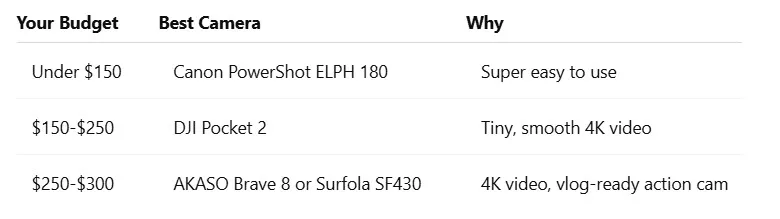
1. Canon PowerShot ELPH 180 (~$140)
Why It’s Great for Beginners:
- Very easy to use
- Compact and lightweight
Video Quality: 720p HD
Pros:
- Budget-friendly
- Simple operation
Cons:
- No flip screen
- Not ideal for dynamic video
Best For: Talking head videos, sit-down vlogs
2. DJI Pocket 2 (~$249 on sale)
If you can stretch your budget, DJI’s pocket gimbal cameras lead my best pocket vlogging cameras guide.
Why It’s Great for Beginners:
- Built-in gimbal for super-smooth video
- Compact and travel-friendly
Video Quality: 4K Ultra HD
Pros:
- Stabilized footage
- Pocket-sized
Cons:
- No flip screen (but you can pair your phone)
Best For: Walk-and-talk vlogs, travel content
3. Surfola SF430 (~$120)
Why It’s Great for Beginners:
- Action cam that’s vlog-ready
- Comes with external mic and remote
Video Quality: 4K/30fps
Pros:
- Comes with a full kit
- Surprisingly solid audio
Cons:
- Audio quality can vary
- No optical zoom
Best For: Outdoor, lifestyle, or sports vlogs
4. AKASO Brave 8 (~$279)
Why It’s Great for Beginners:
- Feature-packed action cam with touchscreen
- Good image stabilization
Video Quality: 4K/60fps
Pros:
- Waterproof
- Voice control
Cons:
- Small screen
- Better for action than studio vlogs
Best For: Adventure vlogs, biking, on-the-go creators
5. Canon VIXIA HF R800 (~$249)
Why It’s Great for Beginners:
- Camcorder style with flip-out screen
- Zoom lens for versatility
Video Quality: 1080p Full HD
Pros:
- Long battery life
- Great zoom
Cons:
- No 4K
- Larger size
Best For: Interviews, family vloggers, events
6. ORDRO EP7 (~$289)
Why It’s Great for Beginners:
- Hands-free, head-mounted vlogging
- Built-in 4K camera
Video Quality: 4K Ultra HD
Pros:
- POV recording
- Wearable
Cons:
- Niche use case
- Less control over framing
Best For: Tutorials, cooking, crafts, action POV
7. YI 4K+ Action Camera (~$199)
Why It’s Great for Beginners:
- Affordable GoPro alternative
- 4K video, touchscreen, voice control
Video Quality: 4K/60fps
Pros:
- Solid stabilization
- Wide-angle lens
Cons:
- No flip screen
- Accessories sold separately
Best For: Travel, sports, vloggers on the move
Looking for even more camera options? Explore my full roundup of the best cameras under $300 for additional budget-friendly recommendations.
Your First Day With Your Camera: Simple Setup Guide
- Unbox your camera - Insert the battery and memory card - Charge the battery fully before first use
- Set it up - Choose “Auto mode” or “Video mode” - Turn on the flip screen if available
- Record a short test vlog - Talk for 30 seconds - Check the lighting and sound
- Watch the video - Are you in focus? - Can you hear yourself clearly?
- Transfer your video - Use Wi-Fi (if available) or a USB cable - Save it to your phone or computer
- Edit - Use free tools like iMovie or CapCut - Trim the boring parts, add music, upload!
5 Mistakes Every New Vlogger Makes (And How to Avoid Them)
- Holding the camera too close Keep it at arm’s length for better framing
Not checking audio
- Always do a quick mic test
Skipping a tripod
- Shaky videos make people click away. Check out my guide to the best tripods under $100 for affordable stabilization options
Recording in bad lighting
- Use natural light from a window or a cheap ring light
Making videos too long
- Aim for 3–5 minutes to start
5 Cheap Accessories That Make Your Vlogs Better
- Mini tripod ($15-25) – Steadier shots, hands-free recording
- External microphone ($20-40) – Boosts sound quality big time. For detailed microphone recommendations, see my guide to the best mics for videographers
- Extra battery ($15-30) – So you don’t lose power mid-vlog
- Memory card ($10-20) – More space = more footage
- Phone holder ($5-15) – Use your phone as a second angle
FAQ: Beginner Vlogging Camera Questions Answered
Do I need expensive equipment to start vlogging? No. All the cameras on this list are under $300 and perfect to get started.
Is my phone enough? Phones are great, but a real camera gives you better quality and flexibility.
What should I look for in a beginner vlog camera? Flip screen, good audio, easy controls, and solid battery life.
Can I grow my channel with a cheap camera? Absolutely. Content matters more than gear; many YouTubers started with basic setups.
What quality do I need for YouTube? 1080p is the sweet spot. All the cameras listed here meet that standard.
How do I get videos off my camera? Use a USB cable, Wi-Fi transfer, or a memory card reader.
For more detailed answers and additional travel vlogging camera recommendations, check out my comprehensive camera guides.